


Table of Contents
A finance manager waiting on secure access to invoice files doesn’t care what category the work falls into. The folder permissions need to be fixed, the data needs to stay protected, and month-end can’t slip because one access change is stuck in a queue.
That’s where managed services vs professional services becomes practical, not technical. Everyday reliability keeps people working, while project expertise handles bigger changes like cloud moves, system integrations, and security planning. In a recent study, 60% of respondents said cybersecurity was the top challenge that led them to work with an MSP.
Mike Gardner, IT Administrator at Crestline IT Services, notes: “Separate the recurring tickets from the planned projects first, then assign ownership, security steps, approvals, and costs before work starts.”
Managed Services Vs Professional Services
Leadership teams get frustrated when a printer outage, a Microsoft 365 permission change, and a cloud migration are treated like the same request. One needs quick daily ownership. The other needs a plan, approvals, and careful timing around staff, data, and risk.
-
Daily IT ownership: Managed services cover recurring support, monitoring, patching, backups, Microsoft 365 administration, endpoint protection, and user support. This keeps staff from losing time to locked accounts, failed updates, or devices that won’t connect before a client meeting.
-
Project-based expertise: Professional services handle defined work such as cloud migrations, infrastructure design, implementation, cybersecurity planning, system integration, and process optimization. The work has a beginning, a scope, and an agreed outcome.
-
Different buying triggers: Managed support fits slow response times, unreliable systems, and helpdesk backlogs. Project services fit office moves, upgrades, migrations, new tools, or compliance preparation.
-
Best used together: Many organizations need steady operational support plus specialist help when technology changes. That mix reduces trial-and-error decisions when a routine ticket exposes a larger infrastructure issue.
|
Business Situation |
Primary Service Fit |
Typical Owner |
Operational Handoff |
|---|---|---|---|
|
New hires need laptops, Microsoft 365 access, MFA enrollment, and printer setup every month |
Managed IT support |
IT service desk manager |
HR sends approved onboarding tickets through the PSA system before the employee start date |
|
Company is moving file shares from an aging Windows server to SharePoint and OneDrive |
Professional IT project |
Project manager and cloud architect |
Department heads approve folder mapping, permissions, migration windows, and user acceptance testing |
|
Endpoint alerts show repeated malware blocks on sales laptops after trade show travel |
Managed security operations |
Security analyst |
EDR alerts are reviewed, affected devices are isolated, and recurring findings are escalated to leadership |
|
Business needs a secure network design for a new warehouse with scanners, Wi-Fi, cameras, and VoIP phones |
Infrastructure design engagement |
Network engineer |
Facilities, operations, and finance approve cabling plans, firewall rules, equipment list, and rollout schedule |
|
Backup failures occur on accounting systems during quarter-end close |
Managed backup and continuity support |
Systems administrator |
Backup console exceptions trigger remediation tickets, restore tests, and CFO notification for critical systems |
Managed Services And Professional Services Support Different Parts Of Daily Operations
Service models only help when they’re tied to real workflows, approvals, and sensitive data. A support plan that looks fine on paper can still fail if nobody knows who approves access to finance folders, who checks backups, or who communicates changes before a reporting deadline.
A not-for-profit finance team preparing month-end reports needs secure file access, working printers, and Microsoft 365 permissions updated before staff can finalize numbers for the board package. Managed support covers the recurring tickets, monitoring, security patching, and access changes that keep those steps moving while protecting finance, donor, client, and HR records. Professional project work comes in when the same organization plans a cloud migration, redesigns backups, or connects a new reporting system to existing data. In that environment, quick response matters because the issue has to be fixed fully, not handed back to staff with half an answer.
Choosing Between Managed Services And Professional Services
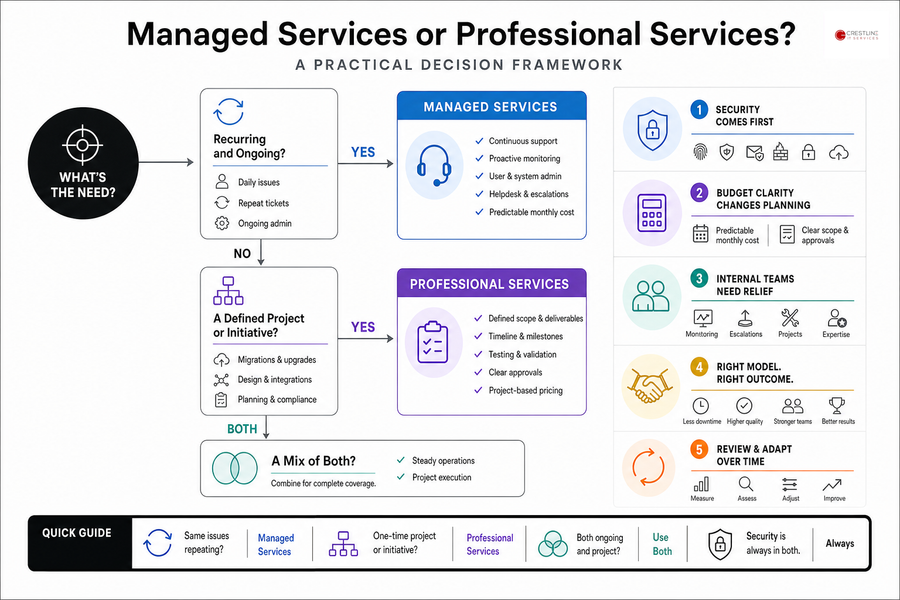
The right choice depends on whether the business problem keeps recurring, belongs to a defined project, or includes both. A password reset queue needs a different rhythm than a server upgrade, but both affect deadlines, approvals, and staff confidence.
-
Recurring support slows work Managed services fit repeated workstation issues, Microsoft 365 administration, user onboarding, password resets, updates, and helpdesk requests. If new hires wait for accounts or staff keep reopening the same ticket, the work needs ongoing ownership.
-
Projects need defined ownership Professional services fit cloud migrations, server upgrades, network redesigns, office moves, cabling, system integrations, and compliance planning. These jobs need scope, timing, testing, and a clear approval path.
-
Security cannot sit aside MFA, endpoint protection, email security, firewalls, encryption, IAM, backups, and monitoring belong in both models. Security comes first because one weak handoff can expose files, mailboxes, or client records.
-
Budget clarity changes planning Fixed monthly pricing helps leadership plan recurring IT costs without surprise fees. Project work still needs clear scope, timeline, and approval points before spending starts.
-
Internal teams need relief Co-managed support helps internal IT staff with monitoring, escalations, projects, and specialized expertise when one person is covering tickets, vendors, updates, and reporting at the same time.
Explore Managed IT Support Options
-
What Are Managed IT Services? A Plain-English Guide For Growing SMB Teams
-
Why Managed Services Matter When SMB IT Keeps Interrupting The Workday
-
How To Choose a Managed Services Provider: Avoid Downtime And Surprise IT Costs
-
How To Spot IT Managed Services Challenges Before They Slow Your Team Down
-
IT Problems Are Quietly Slowing Your Workday. Here’s How To Fix Them
Managed IT Services Compared With Professional Services
Change is rarely just technical. Systems, people, budgets, and risk overlap, so the first step is sorting daily support from planned change before anyone buys tools or books migration dates.
-
Review the last 90 days of support tickets, access requests, outages, and recurring user issues. If the same workstation, mailbox, printer, or permission problem keeps showing up, that points to managed support.
-
List upcoming business changes such as cloud moves, office openings, software rollouts, compliance work, and hardware refreshes. Anything with a defined outcome, timeline, and stakeholder approval likely needs professional services scope.
-
Separate urgent operational risks from future improvement projects. Cybersecurity gaps, backup reliability, aging servers, and Microsoft 365 permissions deserve earlier attention than nice-to-have workflow cleanup.
-
Decide who owns approvals, communication, vendor coordination, and user training. Projects stall when finance approves the budget, operations owns the workflow, and nobody tells staff what changes on Monday morning.
Once the work is sorted, we can match the right service model to the business need, risk, budget, and timing.
Monitoring, cybersecurity, cloud migration, and Microsoft 365 administration each need clear ownership, timelines, and support expectations.
Choose the Right IT Support Model
Clarify what should be managed day to day and what needs project expertise. Crestline IT Services can help you plan the right path.
Professional Services And Managed Support Keep IT Work Tied To Steady Growth
Growing organizations usually need reliable day-to-day IT support at one point and project expertise at another, sometimes in the same month when a new employee setup overlaps with a cloud migration or security review. Good IT planning separates daily reliability from project execution while keeping both tied to business goals, approval steps, risk, and budget.
If you’re deciding what fits your current systems, contact Crestline IT Services and we’ll talk through ongoing managed support, professional services, or a mix of both in plain language. We offer a free, no-obligation on-site evaluation, responsive Ontario-based technicians, and simple flat monthly fees for ongoing support, so the next invoice file access issue, migration plan, or security concern has clear ownership before it slows the work down.