


Table of Contents
-
How To Choose Managed Services Provider For Daily Business Continuity
-
Managed Services Vendor Selection Criteria That Protect Operations And Budgets
-
How To Choose Managed Security Services Without Treating Security As An Add-On
-
Technical Questions To Qualifying MSP Teams For Cloud And Workstation Support
-
Managed Services Selection Criteria For A Long-Term Partnership
The finance manager is waiting on an invoice approval, but the approver can’t get into Microsoft 365. The deadline is close, the vendor is calling, and everyone assumes it’s “just an IT issue.” It isn’t. It’s a business delay with a login screen in front of it.
Mike Gardner, IT Administrator at Crestline IT Services, notes: “Ask who owns the ticket from first call to final fix, because handoffs and vague updates are where everyday IT delays become business problems.”
That’s why how to choose a managed services provider and how to choose managed security services belong in the same conversation. In a recent study, 60% of respondents said cybersecurity was the top challenge that led them to work with an MSP. The practical test is simple: choose a partner that reduces interruptions, protects data, explains costs clearly, and takes ownership fast.
How To Choose a Managed Services Provider For Daily Business Continuity
Provider choice affects the workday, not just the server room.
-
Fast response matters: When a warehouse workstation fails before shipping cutoffs, waiting hours for a first reply can push orders into the next day.
-
One owner per issue: Your managed services selection criteria should confirm who follows a ticket from first report to final confirmation.
-
Monitoring before disruption: 24/7 monitoring helps spot server, network, and workstation warnings before they turn into downtime.
-
Backups and users: Backup readiness and helpdesk support protect both files and people, from deleted folders to password resets.
A clinic receptionist locked out of Microsoft 365 isn’t thinking about infrastructure. They’re thinking about patients waiting at the desk, phones ringing, and records they can’t open. Every minute counts.
Evaluate provider fit by looking at daily capability, not promises. Helpdesk response, monitoring, backups, and security patching should work as one support process.
Managed Services Vendor Selection Criteria That Protect Operations And Budgets
IT vendor selection affects cost control, staff productivity, and risk management every week, especially when support tickets touch payroll, invoices, customer records, and deadlines.
-
Predictable monthly pricing
A flat monthly fee helps you budget without surprise invoices after a busy support month.
-
Response and resolution expectations
Ask how quickly tickets are answered and closed, especially for payroll access, invoice approvals, and point-of-sale issues.
-
Local support coverage
Ontario-based technicians make onsite work, network checks, and hardware replacement planning more practical.
-
Ownership of full systems
Your MSP qualifying questions should show whether the provider manages workstations, servers, Microsoft 365, backups, and security together.
-
Documentation and reporting
About 55% of companies have approached managed service providers to use value-added services and reduce security risks for employees and business partners. Good reports show what changed, what’s open, and what needs a decision.
How To Choose Managed Security Services Without Treating Security As An Add-On
An employee gets a suspicious invoice email that looks close enough to the real vendor to raise questions. At the same time, a manager needs access removed for someone who left last week.
Security gaps become operational problems when the wrong person keeps access, a device misses protection, or backups aren’t ready. Security has to fit daily work across people, devices, cloud accounts, email, and backups.
-
MFA and identity control: Confirm MFA and identity access management for Microsoft 365, admin accounts, and departed staff.
-
Protected endpoints and email: Endpoint protection and email security reduce risky clicks and infected devices.
-
Firewalls and encryption: Firewalls and encryption help protect customer files, finance records, and internal documents.
-
Backups and monitoring: Ransomware protection, tested backups, and 24/7 monitoring matter because 90% of MSPs reported at least one cybersecurity incident in the past year.
Include security in your questions to ask IT MSP teams, not as a separate afterthought.
More On Managed IT Decisions
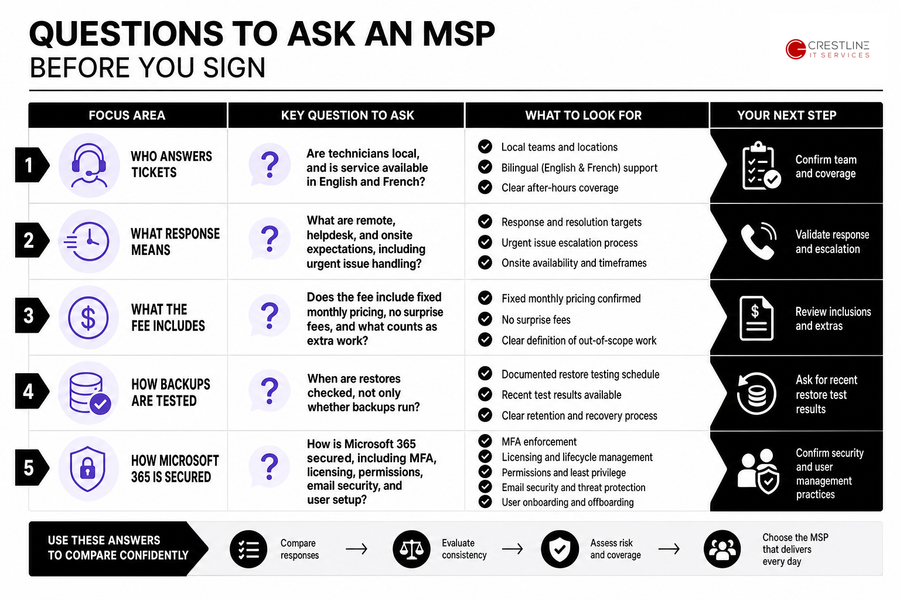
Questions To Ask An MSP Before You Sign
Comparing providers is hard when every proposal sounds similar. B2B buyers spend 83% of their journey researching independently, so your questions need to cut through polished language.
The best questions show how the provider works after onboarding, when a user can’t print, Microsoft 365 blocks a login, or an urgent finance ticket lands at 4:30 p.m.
-
Who answers tickets: Are technicians local, and is service available in English and French?
-
What response means: Ask about remote, helpdesk, and onsite expectations, including urgent issues.
-
What the fee includes: Confirm fixed monthly pricing, no surprise fees, and what counts as extra work.
-
How backups are tested: Ask when restores are checked, not only whether backups run.
-
How Microsoft 365 is secured: Include MFA, licensing, permissions, email security, and user setup in your questions to ask during MSP discovery.
Choose an MSP With Confidence
Use your provider criteria to reduce downtime, clarify support ownership, and plan IT costs with Crestline IT Services.
Technical Questions To Qualifying MSP Teams For Cloud And Workstation Support
A hybrid team starts the day with one remote worker unable to open shared files and a front-desk workstation running slowly during customer check-ins. Technical questions should tie back to smoother work, not complexity.
-
Microsoft 365 administration and security
Ask how users, licenses, MFA, shared mailboxes, and permissions are managed during onboarding and staff changes.
-
Cloud migration planning steps
A good plan covers file locations, downtime windows, third-party integrations, and user training before anything moves.
-
Workstations, patches, and lifecycle
Ask how the MSP handles proactive patching, mobile device support, and hardware lifecycle planning.
-
vDesktop, servers, and networks
Ask how vDesktop, server oversight, cabling, Wi-Fi, and network infrastructure are monitored and maintained.
These managed services vendor selection criteria connect technical depth to fewer delays, cleaner onboarding, smoother remote work, and more reliable day-to-day operations.
Managed Services Selection Criteria For A Long-Term Partnership
Changing providers, or choosing one for the first time, takes internal effort. Staff worry about handoff, leaders worry about downtime, and no one wants important details lost between old tickets, passwords, and backup settings.
-
Inventory core systems: List servers, workstations, Microsoft 365 accounts, cloud apps, printers, mobile devices, and network gear.
-
Collect ticket patterns: Pull recurring issues, such as slow logins, shared drive access, VPN problems, or repeat printer failures.
-
Review current IT costs: Include software licenses, hardware repairs, emergency support, security tools, and staff time spent chasing updates.
-
Document protected data: Identify customer records, payroll files, finance folders, clinic notes, contracts, and approval workflows.
-
Check backups and workflows: Confirm backup status, note critical deadlines, then schedule a provider evaluation, such as our free, no-obligation on-site review, with facts in hand.
MSP Qualifying Questions For A Steadier Workday
When a finance manager is waiting on an invoice approval and a workstation issue slows the handoff, choosing an IT partner comes down to ownership, security, clear pricing, response expectations, and fit with the way your team works.
If you’re working through technical questions to qualifying MSP teams, talk with us at Crestline IT Services about where IT is slowing the business down and what needs to be steadier.
We bring local Ontario support, proactive monitoring, confidentiality, and simple fixed monthly pricing with no surprise costs, so your systems are managed with the same care we’d expect inside our own workplace.