


Missed helpdesk tickets don’t stay small for long. A staff member can’t get into Office 365, an invoice waits for approval, a patch restarts a workstation during a customer call, and nobody’s sure last night’s backup was checked. These IT managed services challenges pull attention away from customers, approvals, and growth.
As Perry Stathopoulos, CEO at Crestline IT Services, puts it: “When daily IT issues spiral, they drain your team’s energy and stall company momentum. Leaders don’t just need a helpdesk; they need a partner who proactively stops small disruptions from becoming business-wide bottlenecks.”
Reliable IT needs clear ownership, quick response, secure systems, and predictable follow-through, so work keeps moving instead of waiting on another ticket update. Routine technology work should never become another management burden during a busy day.
Early Warning Signs Of Managed Services Challenges
Small service gaps usually show up first in routine work. A payroll file won’t sync, a printer ticket sits open, or a manager waits for approval because one user account still isn’t fixed.
-
Tickets sit too long: Staff lose time following up on access, printer, device, or account issues when the helpdesk doesn’t close the loop.
-
Patches interrupt work: Updates run during busy hours and restart workstations while staff are entering orders or responding to customers.
-
Backups feel uncertain: Someone assumes backups are working, but restore tests, alerts, and failed job notices aren’t reviewed consistently.
-
Vendors point fingers: Internet, software, hardware, and cloud providers each blame another system while the business waits for one person to coordinate the fix.
These warning signs lead naturally into a closer look at where support, security, cloud administration, and vendor ownership break down.
Where IT Managed Services Provider Challenges Affect Daily Operations
When no one clearly owns IT, work slows in places leadership can see: delayed approvals, repeated tickets, missed customer follow-ups, and budget questions without clean answers.
-
Slow response to urgent tickets. Access issues and workstation problems delay staff who need to serve customers, process invoices, or update shared files.
-
Unclear ownership across vendors. In practice, IT managed services provider challenges often surface when no one coordinates software, internet, hardware, and cloud support.
-
Weak follow-through after fixes. A password reset or reboot gets a user moving again, but repeat incidents point to a root cause that still needs attention.
-
Poor visibility into risk. Missed alerts, patch gaps, endpoint warnings, and backup failures stay quiet until a user can’t open a file or a system won’t recover cleanly.
-
Costs that keep shifting. Unplanned support work makes it harder to plan hardware refreshes, licensing changes, and cloud projects.
A better operating pattern is one accountable service partner coordinating these handoffs instead of leaving you to chase vendors, tickets, and device problems while the workday backs up.
How Managed Services Providers Challenges Show Up In Security And Cloud Work
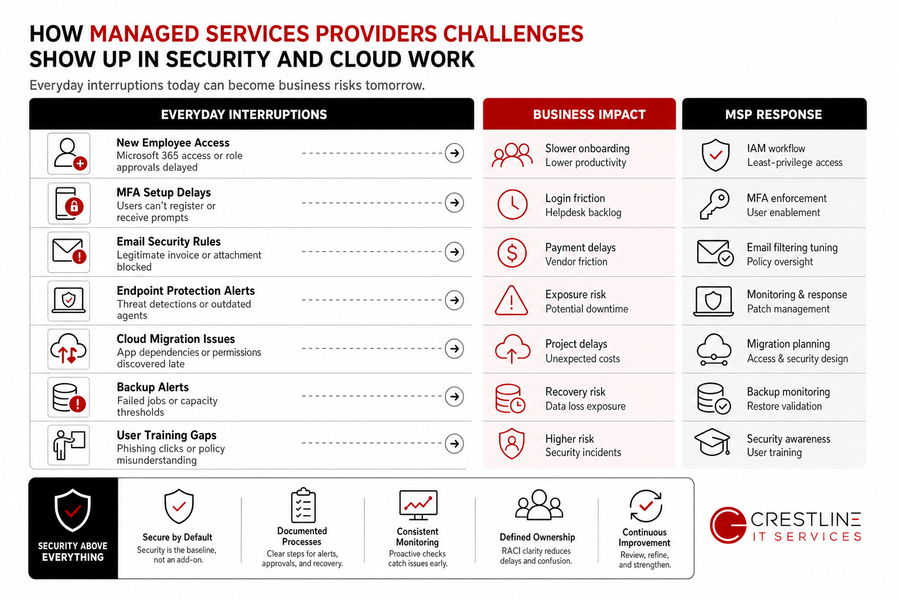
Security and cloud administration need steady oversight because small interruptions often carry larger risk. Managed services providers challenges can affect Microsoft 365 administration, endpoint protection, firewall oversight, email security, MFA, IAM, encryption, backups, and cloud support when alerts, approvals, and recovery steps aren’t documented clearly.
Real-world snapshot: A new employee needs Microsoft 365 access before their first customer handoff, but MFA setup waits on an unclear approval. At the same time, an email security rule blocks a legitimate supplier invoice, and a backup alert needs review before payroll files are touched. None of these tasks is unusual, but each one needs an owner who knows the process and the business impact.
Security should be part of the managed service baseline, not an add-on discussed after a problem. Consistent monitoring and documented processes reduce confusion around who reviews endpoint warnings, approves permission changes, and confirms recovery steps.
Once security and cloud responsibilities are clear, the next step is deciding which operating habits keep support predictable. Helpdesk routing, patch scheduling, backup validation, and Microsoft 365 administration all need owners and review rhythms.
More On Managed IT Challenges
Get Ahead Of IT Service Gaps
If tickets, patches, backups, or vendors are slowing work down, Crestline IT Services can help you bring clearer ownership to daily IT.
Practical Steps For Reducing IT Managed Services Challenges
Improving IT operations isn’t just a tool change. It takes steady habits, assigned roles, plain-language documentation, and follow-through when the same ticket, device issue, access request, or backup alert keeps coming back.
-
Assign clear owners: Define who handles user access changes, vendor escalations, backup checks, critical alerts, and approval handoffs.
-
Review recurring tickets: Look at repeat device, application, network, and training issues so the same workstation or workflow doesn’t keep draining time.
-
Schedule patching around work: Plan updates around billing runs, order entry, customer service coverage, and shared desktop use.
-
Validate backup routines: Confirm monitoring includes restore testing, alert review, file location checks, and documented recovery steps.
-
Align Microsoft 365 settings: Match licensing, security settings, permissions, and shared mailbox access to current roles and approval requirements.
At Crestline IT Services, this practical rhythm fits with predictable monthly fees, proactive maintenance, monitoring, backups, and security patching, giving technology planning a steadier foundation.
Getting Managed Services And Challenges Under Control With The Right Partner
Better managed IT shows up in ordinary work first: fewer Office 365 login delays, clearer ticket ownership, stronger security checks, cleaner backup reviews, and costs that are easier to plan before hardware, licensing, cloud, or development needs change. No surprise costs.
If managed services challenges are showing up in your helpdesk queue, backups, cloud environment, network, endpoints, or vendor handoffs, contact Crestline IT Services to review your current support model, security posture, backup protection, cloud setup, and day-to-day helpdesk needs. With over 30 years supporting Ontario SMBs, we work as an extension of your team through managed IT, cybersecurity, cloud management, infrastructure oversight, Office 365 administration, Marketing IT Services, and web, web-app, and mobile app development, and the conversation can start with a free, no-obligation on-site evaluation.