


Table of Contents
-
Types Of Managed IT Services That Stabilize Daily Operations
-
How Types Of IT Managed Services Reduce Business Interruptions
-
Types Of Managed Services For Security And Compliance Readiness
-
Types Of Managed Technology Services For Cloud Workflows And App Support
-
Choosing The Right Types Of Managed Business Services With Crestline IT Services
A finance team is waiting on Microsoft 365 access before invoice approvals. A helpdesk user can’t open the software needed for a customer deadline. A server alert lands before payroll, and someone has to know whether it’s noise or real risk.
That’s why understanding the types of managed services matters. Operational maturity, not IT labels. In 2024, worldwide spending on IT services hit $1.59 trillion, up 5.6 percent, which shows how central reliable support has become. Fewer interruptions. Clear ownership. No daily firefighting.
Mike Gardner, IT Administrator at Crestline IT Services, notes: “Stable, secure IT support gives leadership fewer daily interruptions, clearer costs, and a team that owns the issue until the work is done.”
Types Of Managed IT Services That Stabilize Daily Operations
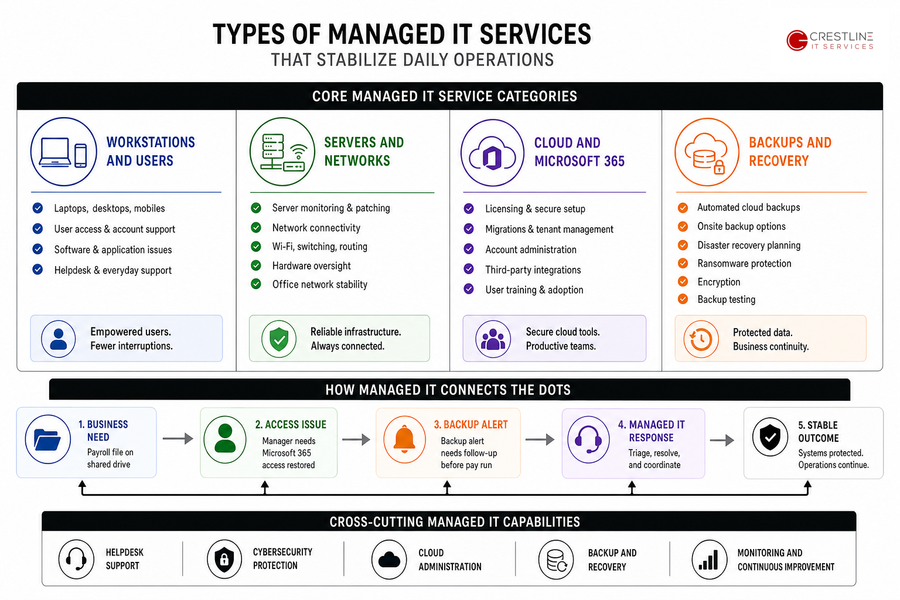
Service categories matter because they show who owns each part of your environment. If a laptop fails, a backup alert appears, or a Microsoft 365 account needs a license change, the agreement should make the next step clear.
-
Workstations and users: Support covers laptops, desktops, mobile devices, user access, software issues, and everyday helpdesk needs.
-
Servers and networks: Monitoring, patching, hardware oversight, connectivity, Wi-Fi, switching, and office network stability keep core systems available.
-
Cloud and Microsoft 365: Licensing, secure setup, migrations, account administration, integrations, and training reduce access delays and tool confusion.
-
Backups and recovery: Automated cloud backups, onsite backup options, disaster recovery planning, ransomware protection, encryption, and testing protect files teams rely on.
A payroll file sits on a shared drive, a manager needs Microsoft 365 access restored, and a backup alert needs follow-up before the next pay run. Managed IT should connect those dots, not treat each one as an isolated ticket.
These categories turn support coverage into business continuity by connecting daily issues to clear ownership and a predictable support model. Helpdesk support, cybersecurity, cloud administration, backup and recovery.
How Types Of IT Managed Services Reduce Business Interruptions
A dispatcher can’t print work orders, a new hire is missing Microsoft 365 access, and finance is waiting for approval routing before invoices go out.
-
Fewer stalled support tickets. Responsive remote support reduces delays for access, printing, software, and device fixes. Our IT support average remote response time is less than 30 minutes, with average resolution under 1 hour.
-
Cleaner access and approvals. Microsoft 365 administration, MFA, IAM, licensing, and user changes keep joiners, movers, and leavers from creating access risks.
-
More predictable IT spending. A flat monthly fee helps reduce surprise support costs and gives leaders a clearer way to plan workstation, server, and cloud support.
-
Better protection for customer data. Layered security brings endpoint protection, email security, firewalls, encryption, and monitoring into daily work. The need is practical, since 4 out of 5 non-platform organizations say security operations can’t effectively handle threat volume, and 40% of alerts go uninvestigated.
-
Less disruption from aging systems. Hardware lifecycle planning, patching, maintenance, and infrastructure planning reduce surprise failures during busy periods.
Choosing between types of IT managed services changes workflows, approvals, budgets, and habits, so start with the work people do every day.
-
Inventory critical applications and who owns them.
-
Identify recurring tickets that slow down teams.
-
Review backup status and recent test results.
-
Confirm who approves user access and licensing changes.
Types Of Managed Services For Security And Compliance Readiness
A suspicious email reaches finance with a vendor payment change request. Someone approves MFA from the wrong device. A laptop needs encryption before travel, and the office manager needs to know who handles it.
Security services belong inside managed IT because risk shows up through normal work: invoices, approvals, customer records, shared folders, cloud apps, and mobile devices. Firewalls, endpoint protection, email security, MFA, IAM, encryption, and 24/7 monitoring need to be built into support decisions, not added after a problem.
-
Email threat protection: Phishing filtering, suspicious attachment controls, domain protections, and user reporting workflows help staff escalate questionable messages.
-
Endpoint and device controls: Antivirus, patching, encryption, health checks, and lost-device procedures protect laptops, desktops, and mobile devices.
-
Identity and access management: MFA, role-based access, account reviews, and fast removal of departing users reduce gaps in Microsoft 365 and other systems.
-
Backup and ransomware recovery: Automated backups, monitoring, restore testing, encryption, and disaster recovery planning help protect files and reduce downtime.
A finance team receives a vendor payment change request, a technician checks email from a mobile device, and an office manager needs a clear escalation path. The right process tells each person what to do without slowing down valid work.
Once security controls are stable, cloud and workflow support become easier to manage. Identity management, endpoint protection, email security, disaster recovery.
Keep Exploring Managed IT Services
Types Of Managed Technology Services For Cloud Workflows And App Support
A marketing team needs access to a campaign tool before launch, but the approval sits between Microsoft 365, a shared mailbox, and a CRM integration. The form works on the website, yet leads aren’t reaching sales. Cloud work needs clear ownership, especially when 69% of respondents say their team lacks the skills needed to manage cloud applications proficiently.
-
Cloud migration support: Planning, migration assistance, service delivery, and ongoing support keep moves from disrupting files, permissions, billing, or customer-facing work.
-
Microsoft 365 optimization: Secure setup, administration, licensing, training, and integration help reduce unused licenses and unclear access paths.
-
Virtual desktop services: Maintenance, management, secure remote access, and support give remote employees reliable access to key tools.
-
Marketing IT support: Support for marketing teams and agencies helps when apps, forms, approvals, reporting, or campaign workflows depend on connected systems.
-
Web and app development: Web, web-app, and mobile app development support helps business systems connect when manual work slows teams down.
The broader types of managed IT services now include cloud cleanup, which often touches permissions, billing, old accounts, duplicate tools, and internal workflows.
-
Map which cloud tools support revenue, operations, finance, and customer service.
-
Review Microsoft 365 licenses for unused or mismatched plans.
-
Document app owners and escalation paths.
-
Prioritize integrations that reduce duplicate data entry.
Clarify Your Managed IT Coverage
Know which services should protect your users, systems, cloud tools, and backups. Crestline IT Services can help you identify the right next step.
Choosing The Right Types Of Managed Business Services With Crestline IT Services
The right managed services model should match how work actually gets done, from user support requests and Microsoft 365 access to backups, disaster recovery, cybersecurity, infrastructure, helpdesk tickets, and development support.
As an Ontario-based team with over 30 years of experience and technicians across Aurora, Ottawa, and Nepean, we support SMBs with practical helpdesk, infrastructure, cybersecurity, cloud, and backup services under predictable monthly support.
If you want a clearer picture of what your environment needs, contact Crestline IT Services for a free, no-obligation on-site evaluation. We’ll walk through your systems, risks, workflows, and support gaps in plain language so the next payroll alert, access request, or backup issue has a clear owner.