Congratulations on your migration to Office 365.
You will now need to configure your iPhone or iPad to connect to your Office 365 mailbox. Luckily it’s very straightforward if you follow these instructions:
-
- Go to Settings
- Select Mail, Contacts, Calendars
- Select Exchange as the type of account

-
- Enter your email and password for Office 365
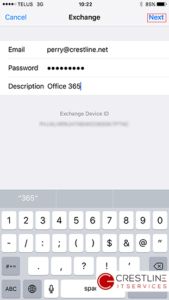
-
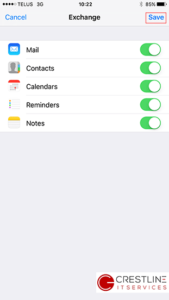
- If all goes well you will then select the items to sync with your phone
If you have any issues feel free to contact our awesome support team at support @ crestline .net or 905-727-7978